Anypay – Track Spending,
Budget Smartly, Live Better

Anypay – Track Spending,
Budget Smartly, Live Better

Anypay – Track Spending,
Budget Smartly, Live Better

Anypay is a mobile app that can help you track your daily spending, stick to your budget, and make payments all in one place—from airtime and electricity to internet, data, and transfers. It’s built to help you understand where your money goes, save smarter, and stay in control of your finances with ease.

PRODUCT

PRODUCT

Anypay – Fintech Mobile App

PROJECT DURATION

PROJECT DURATION

6 WEEKS

6 WEEKS

ROLE

ROLE

Product Design

Product Design

SCOPE

SCOPE

Dashboard, Savings,

Statistics, and Profile Screens

TOOL USED

TOOL USED

Figma, Notion, Google Forms

PROBLEM STATEMENT

PROBLEM STATEMENT

In today's economic climate in Nigeria, inflation has led to a noticeable decline in purchasing power. People are losing control of their daily spending, often exceeding their budgets without realizing it. This pattern creates financial instability and prevents long-term saving.

In today's economic climate in Nigeria, inflation has led to a noticeable decline in purchasing power. People are losing control of their daily spending, often exceeding their budgets without realizing it. This pattern creates financial instability and prevents long-term saving.

Design Goals

Design Goals

To design a mobile app that:

  • Enables users to track their daily spending habits in real-time.

  • Helps users set budgets and save smartly toward financial goals.

  • Provides simple, fast, and secure payment options in one place.

  • Maintains a minimal, intuitive UI that accommodates users of various tech proficiencies.

APPROACH

APPROACH

I followed a user-centered design process combining research, ideation, wireframing, prototyping, testing, and iteration to ensure usability and simplicity.

Design Process

Design Process

Understand the Problem

Understand the Problem

Understand the Problem

  1. Understand/ Empathize

  2. User Research

  1. Understand/ Empathize

  2. User Research

Ideation

Ideation

Ideation

  1. Define & Plan

  2. Sketch & Wireframe

  1. Define & Plan

  2. Sketch & Wireframe

Design and Prototyping

Design and Prototyping

Design and Prototyping

  1. Visual Design

  2. Prototype

  1. Visual Design

  2. Prototype

Evaluate and refine

Evaluate and refine

Evaluate and refine

  1. Test & Iterate

  2. Deliver

  1. Test & Iterate

  2. Deliver

Understand/Empathize

Understand/Empathize

I did the following to understand the problem

  • Met and Aligned with stakeholders to define the product direction, demographic and scope

  • Explore the market and user environment to find trends and related application available

  • Define a clear problem statement.

User Research

User Research

I carried out a research on potential users

  • Create surveys and conduct interviews

  • Identify user pain points and behavior patterns

  • Organize insights with Affinity Mapping

Define & Plan

Define & Plan

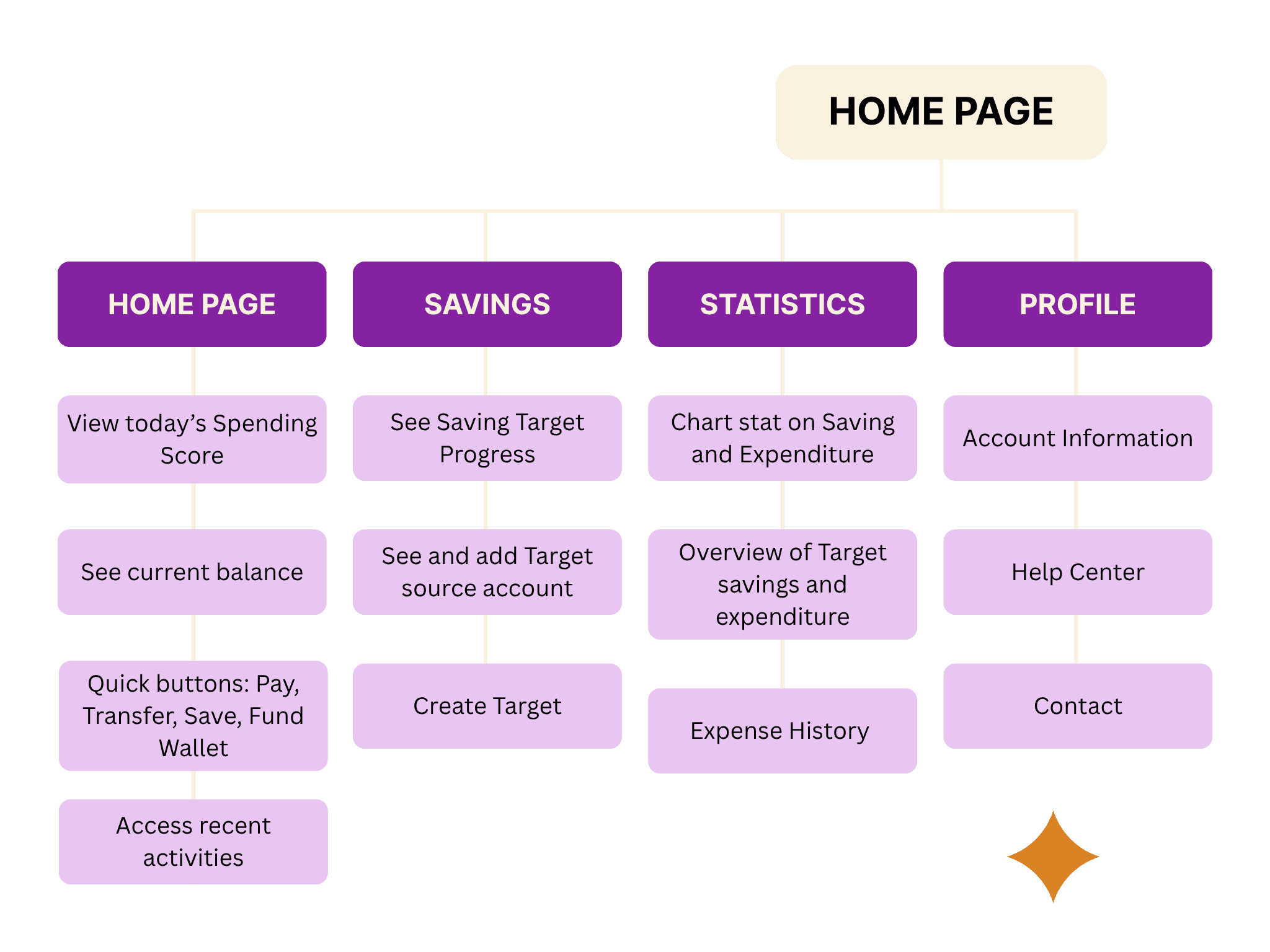
Then we defined and planed the architectural structure of the solution based on insight gotten from research phase.

  • Develop user personas

  • Map user journeys

  • Outing goals and cases

  • Create a sitemap and app flow

User Personas

User Personas

Site Map

Site Map

Sketch & Wireframe

Sketch & Wireframe

I sketched the wireframe idea on paper

  • Create low-fidelity wireframes

  • Focus on structure and task flow, not visuals

  • Share early drafts for feedback

Task Flow to check if user is spending below or above budget

Task Flow to check if user is spending below or above budget

Task Flow to check if user is spending below or above budget

Design and Prototyping

Design and Prototyping

Key Screens Breakdown

Dashboard

Dashboard

Dashboard

Savings

Savings

Savings

Statistics

Statistics

Statistics

User Profile

User Profile

User Profile

Design and Prototyping

Design and Prototyping

Clickable Prototype

Prototype

Prototype

💬 Usability Testing & Feedback

💬 Usability Testing & Feedback

💬 Usability Testing & Feedback

I tested a clickable prototype with few users.

Feedback Highlights:

  • Users liked the spending score system.

  • Found the “Statistics Page" very helpful in seeing expenses.

  • Wanted larger buttons and clearer color contrast.

Iteration Made

Iteration Made

  • Increased button sizes for payment tasks.

  • Added onboarding tooltips on key features.

  • Improved accessibility with contrast fixes.

  • Added two new screens to the design, "Savings and User Profile"

Before and After

Before and After

WHAT I LEARNED

WHAT I LEARNED

WHAT I LEARNED

Designing for fintech in Nigeria means balancing functionality with clarity. People don’t just want to do more—they want to understand more. Making financial tools feel simple and empowering is more valuable than just “adding features.”

📌 Note: Work in Progress

📌 Note: Work in Progress

This project is still ongoing. What you see here reflects the current progress made so far — from user research to core screen designs. Further iterations, usability testing, and feature refinement are currently underway as we continue to improve Anypay based on user feedback and product goals.

Other Projects

Previous Project

Next Project

Stay tuned for design inspiration, industry trends, and updates on my latest projects! Follow me on social media

Stay tuned for design inspiration, industry trends, and updates on my latest projects! Follow me on social media

Stay tuned for design inspiration, industry trends, and updates on my latest projects! Follow me on social media

Create a free website with Framer, the website builder loved by startups, designers and agencies.